A few months ago, I took possession of a MacBook Neo in a lovely shade of Indigo. It’s been a few months since it entered my fleet, doing laptop-related things.
How has it been to live with?

The Macbook Neo in question,
Let’s start at the beginning.
I picked up this MacBook Neo just before Aircraft Interiors Expo in April, mainly as I wanted a reliable laptop whilst on the road, with a working keyboard and enough horsepower to get me through the show, whilst keeping me fed with entertainment options in the evening.
My review is still available here.
I noted that whilst performance was bursty (so, good in short bursts, but sluggish in others), Apple seemed to have made cuts in the right places that would not compromise.
So the question becomes, what’s happened since then? Obviously I didn’t return it to the Apple Store after I was finished with it, and given the way it’s been treated, this MacBook Neo isn’t an Apple review sample.
Let us go on a journey of experiences, thoughts and rambling.
The Configuration
Apple offers the MacBook Neo in two configurations.
- A 256Gb storage option
- A 512Gb storage option with Touch ID sensor
The Neos are built on the Apple A18 Pro (A18 Pro chip (with 6-core CPU with 2 performance and 4 efficiency cores, 5-core GPU, 16-core Neural Engine), processor with 8Gb of RAM, with a 13″ IPS Screen at 219 pixels per inch, up to 500 nits brightness, two USB-C ports (one at 10 Gbps, one at 480 Mbps) and a headphone jack.
So what’s happened since then?
Since AIX, the MacBook Neo has been in my day-to-day backpack with my work Surface Laptop, a pile of cables and chargers, and a mug I seem to carry in my rucksack.
And yes, I’m more than basic when it comes to backpacks for work – I stick to a Targus backpack. This one is a 40th Anniversary Cyprus Ecosmart backpack – and was an eBay bargain.
Other than that, it lives in a messenger bag of some sort normally during the weekends. Such as this one, which might be sponsored by Stella Aerospace (part of Airbus Atlantic).

Although with this bag, it’s a choice between a laptop or a camera. Not both. Finding the right messenger bag is a pain… but that’s another story.
My software loadout hasn’t changed much since I set up the device, mainly because it’s a fully functional solution.

Browsing is handled using Firefox (primary), with Chrome being kept to run this blog on. Opera is used for VPN-required activities, whilst Safari… is there.
Most Office applications are run in the cloud (be it Microsoft Office or Google Workspace), mainly as I don’t use a lot of the heavier features on them when writing or editing. Local editing is handled with BBEdit in free mode for text-bashing.
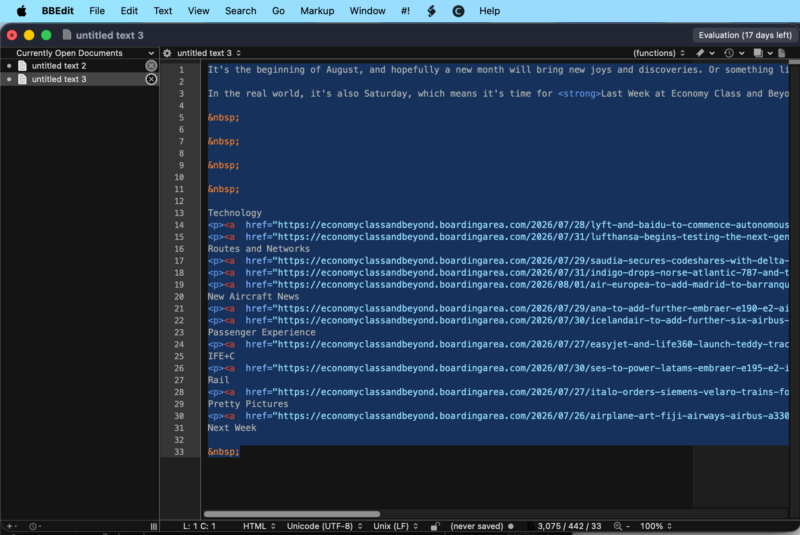
BBEdit showing a post in text edit – this was a simple end-of-week post I was finishing here, stripping and replacing HTML elements. And, yes, I still hand-code some of my posts still. My HTML editor days haven’t left me yet.
I’ve left Microsoft Teams on the laptop – it’s been helpful in the real world when there have been issues. You all know what Teams looks like, so I’m not showing off a private tenant and the content in it.
And then there’s Adobe Lightroom Classic. If there’s a bit of software that can show both the strengths and weaknesses of the MacBook Neo, it’s Lightroom Classic.

Assisted Culling. Both a blessing and a curse in Lightroom Classic.
I stick to Lightroom Classic, as I prefer to work locally on my photos, without the need to go onto the internet each time I need to make a change and synchronise items. That is, different devices have different libraries for good reasons (for example, my MacBook Pro contains Smart Previews of my working images, whilst the Neo handles “live” projects and sets I’m currently working through, meaning nothing is stored long-term.
In browsing and basic edits, Lightroom performs fine. It’s a little bit slow, but no slower than Lightroom Cloud was on an Intel i3 running ChromeOS.
It’s when we come to functions like Denoise or CPU-intensive tasks where this laptop slows to a crawl and becomes more challenging to use, as these CPU cores just aren’t cut out for the long processing times. I’ll go into a practical example in a bit.
What have I liked about the MacBook Neo?
Portability
This thing is throw in the bag and go. Its weight isn’t much of a deal at 1.23Kg (and for those who whine that heavy, I need only take you back to 2008, where 2- 3 kg laptops were the norm). It’s a little lighter than my Surface and a lot lighter than the MacBook Pro with its clapped-out keyboard.
Build Quality
Whilst it might be a cheaper aluminium chassis than the milled-from-one-piece MacBook Pros, it is still an aluminium chassis – thus, it’s built like a tank, able to take knocks and drops without thinking about it. Yes, mine might have got a knock from the floor of the Ibis Budget, but it shows how strong the thing is.

The Screen
I’ve got no complaints about the 500 nits screen. As it’s IPS-based, yes, there is a glow when looking in the dark, with blacks not so inky black. Otherwise, its viewing angles are great and fine for indoor working.
The lack of a notch is welcoming, although the MacBook Pro notch never bothered me.
The Keyboard and Touchpad
No backlit keyboard isn’t a pain to me – like some people, I learned to type on a mechanical typewriter, then a BBC Micro Model B, then moving on to RM Nimbus and IBM Model M Keyboards.
Whilst the MacBook Neo keyboard isn’t a patch on a Model M, it’s passable if you’ve lived on a Magic Keyboard since 2019 on a Mac.
Would I prefer a classic ThinkPad-style keyboard (with proper caps and no chicklets)? Absolutely. However, chicklets are the way the world is today. And I’ve still yet to find a mechanical keyboard I like.
As for the touchpad, it’s certainly different to the glass and haptic feedback touchpads, but it’s still more than passable, and a lot better than some of the diving-board style laptop trackpads I’ve used. Still sounds a little weir,d though, when in a quiet environment.
TouchID
Probably the simplest of things, but having TouchID with this MacBook Neo has made it easy to live with when switching between sessions and locations. Whilst I love Windows Hello Face Recognition, as well as Face ID on Apple iPhone (why they never implemented it on the MacBook Pro is still beyond me), for a budget-segment laptop, it’s more than fine.
What’s really bugged me about the MacBook Neo?
Only two things have really irked me about the MacBook Neo.
The A18 Pro, for some tasks, is just a little bit underpowered
I’ve noted this in the Lightroom section above, but here is an in-depth example
A good example is this file below. It’s a 10.2Mb Canon CRAW (Compressed RAW), shot on a Canon EOS R6 MkII.

Running a quick auto-tone on the file is two seconds of waiting – more than ontime right for processing. A nice “bursty” workload.

The fun starts when I run a de-noise on the image, given that the ISO has been set at ISO3200, and it needs a bit of digital noise removed. This took the best part of 38 seconds to achieve. On my MacBook Pro, around 20 seconds to complete the same workload.

Another example is when I switched on Assisted Culling functionality in Lightroom.
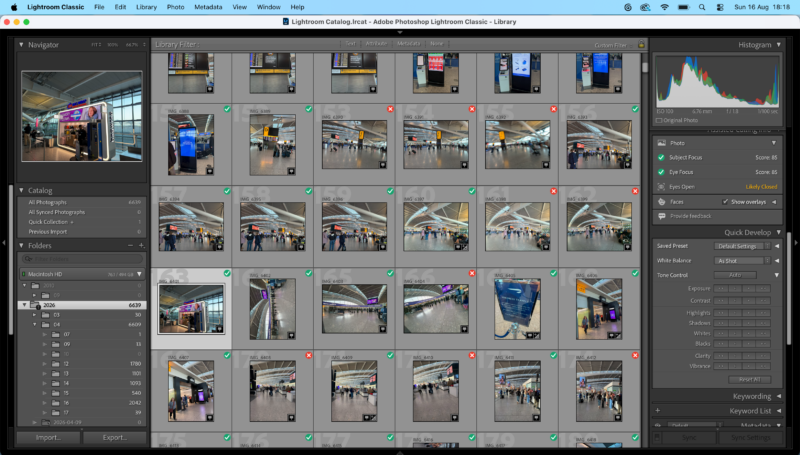
Let’s face it – I take waaaaaay too many photos, so I’ve welcomed tools like this. On the MacBook Pro, it continued to breeze through the files and thumbnails – even if it took a few days due to the number of photos. On the MacBook Neo, Lightroom constantly crashed during the build process, as the two performance cores gave it all they got… and yet not enough for Lightroom
Again, long CPU-intensive tasks are not this computer’s forte.
But I can live with that – switch off Assistive Culling or supervise when it needs to do it. There’s one thing I can’t change, however…
Battery charging
The thing that really annoys me about the MacBook Neo is the weak charging circuit, which charges at around 20 watts (peaking at 30 watts). Whilst I can go for two or three evening sessions without a charge (which is about 6-8 hours of use and the rest in standby), like any laptop, it needs to get a top-up now and again.
But recharging this laptop is slow, with it needing a good two to three hours to get a decent charge in it. Those who are used to rapid-charging batteries need to look elsewhere.
The only upside is that this laptop can charge from a battery bank – so it’s easy to go up on the road, without reaching for another charger.

As for mains chargers, I vary depending on my mood what I use – be it a Dell, Apple, Lenovo or Morphie power brick if I’m at home, or, if I’m in a European-plug-style nation, an Isy 65-watt charger.
But what other factors impact a purchase? Especially in these odd computing times.
What do I mean by that?
The RAMageddon has ruined a good value laptop.
The RAMageddon has come for all of us, with all the markets impacted by rising prices in DRAM, thanks to tightening supplies, AI data centres, and the usual suspects hoovering up all the spare chips they can get, whilst manufacturers pivot to High Bandwidth Memory.
Here’s a oversimplied example: a kit of 2x8Gb of Corsair Vengeance 16 GB DDR4

And let’s not talk about DDR5. That’s downright depressing.

And even Apple, whose memory and storage upgrade pricing has always been overpriced, seems to be unable to swallow the prices that the supply chain is charging, with both MacBook Neo models getting US$100/£100 price uplifts.
For some, this will change the value proposition, as what was a $600/£600 laptop is now a $700/£700 device, while the upgraded device is nearer $800/£800 at retail.
That’s a significant jump, especially for those who are buying in the back-to-school season, with the cost of living being so high at the moment.
If you are considering buying one, if possible, get it through the educational pricing if you can, which will cut the price by £100/US$100. Alternatively, Amazon UK is still offering old prices (subject to how long they stay in stock).
It might be best not to buy this directly from Apple, especially if you are trying to get discounted prices – other than the educational pricing. And unsurprisingly, the MacBook Neo isn’t discounted on the Employee Purchase Programme storefronts (for those who have access to them).
What about if I had gone back into the PC World?
If I were buying new (and in the PC World, that’s normally a hard pass for me, as there is a lot better value to be had in the second-hand market), the nearest thing I would have selected would be the Dell XPS 13… which you can get for £699 at a base price – if you’re a student. Others have responded, including all the usual names (Acer, ASUS, HP, Lenovo and so on) with “value devices” trying to blow the MacBook Neo out of the market.
Whilst these give you access to the Windows platform and the software you can acces, you start to run into the issues with that platform, given that Microsoft controls the OS. Austin Evans explains in his XPS review.
Yes, you could deploy Linux and have a substantially better experience, if you have the technical chops for it. And provided your application pool supports it.
The same could be said of ChromeOS. I daily drove a Lenovo IdeaPad 5i Convertible Chromebook for some time, and whilst I could do a lot of the web-based workload, applications were… annoying at best (yes, Adobe Lightroom strikes again).
Sideloading LibreOffice and Firefox helped (when I was able to deploy the Linux subsystem), but again, it’s a different walled garden. For some, you’ll have no option of buying one for education needs.
Would I have been better off with a better MacBook Air or a second-user laptop?
For the same price, I could have ended up with a second-hand M2 MacBook Air, or for a few hundred more, I could had spluged with a MacBook Air M5 and have a mobile processing beast.
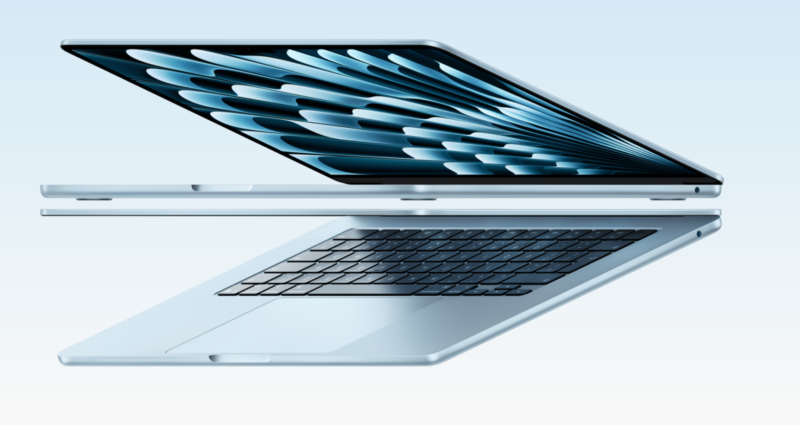
The MacBook M5 Air
Both would chew through Lightroom edits without any problems. Except for this laptop, that’s more of an edge case.
What do I mean by that? Whilst running Lightroom as an indexing and cataloguing solution, with minor editing a requirement, deep editing was always going to be a much less frequent task for me – and given this laptop is a secondary device, I have to frame my workload like that. I don’t need stellar performance at all times – just enough to get the job done.
An M5 MacBook Air would have been too much power for a simple editing machine and would have been under-utilised.
Whilst an M2 MacBook Air would have fit the bill and given the performance envelope, exceeding my requirements by a small margin. However, I’d be on the hook straight away for a battery swap to keep it in service in the medium term, given M2’s are heading to over five years out. And that’s a nasty chunk of change (£159 at the time of writing, plus the time the machine would be away for the battery swap).
That’s one less cost I can do without.
Your mileage will vary, and your own use-cases may point you towards the MacBook Air. That’s fine. In any case, I would strongly suggest you try before you buy.
What I would not do is pick up any Intel-based Mac at this point. With macOS Tahoe being the last supported version of macOS on the limited Intel devices, along with limited security updates in the future, whatever the savings, Intel-based Macs are not the way to go. Even for back-to-school stuff. If you want one to tinker with, load OpenCore Patcher and have fun with it. But software support is going to start falling off a cliff very soon.
What about iPads?
I’ve tried to make iPads work with my use case over the years, and whilst the toolset has come along as well as iPadOS, I’m used to structured file systems, overlapping windows and customisable application sets not constrained by walled gardens – and iPadOS is just that bit too constrained to be used how I want to work and how it fits in with my workflows.
And yes, I’ve tried. App behaviour forms a lot of the problem (with JetPack/WordPress annoying the heck out of me, Google Docs being less than ideal and Safari? It’s a fine enough browser, but it has its limits, and I’ve always preferred another engine to render my content, with Apple, of course, limiting the only web-rendering technology on its iPad platform as… WebKit.
Thus, iPads fail for me as a content creation platform. That and the memory managment/tombstoning of applications is something I want to control in a production environment, not let the OS manage for me.
Whilst Apple might be on target to deliver a touch-screen Mac soon, it won’t be in my budget – I can guarantee that.
So, am I happy with it?
The easiest way I can explain how I feel about the MacBook Neo is simple. One day after work, I left the MacBook Neo at home and had to use my Surface Laptop 4. And it’s a more than competent computer (even if the poor thing suffered in the heat and an Outlook session I hadn’t closed in a few days).
When I went to reach for the MacBook Neo and remembered I only had the Surface, I went… Ew. The Surface is one of the better Microsoft experiences, but using it for my activities… I was missing something.
That was macOS and how it integrates into my workflows when writing, editing and creating content – be it for this blog or for other things. And macOS has been a core part of my workflow that I’ve had trouble replicating on other platforms (and I include iPadOS in that same breath).
And the MacBook Neo is a perfect conduit that has powered this blog for the past few months – and I’m looking forward to it on future trips as I continue to write this blog.
Put it like this: for my next big trip, unusually, the MacBook Pro will sit at home, and the Neo will travel first.
And that’s surprising, even for your author.
Welcome to Economy Class and Beyond. Your no-nonsense guide to network news, honest reviews, in-depth coverage, unique research, as well as the humour and madness I only know how to deliver.
Our Social Media pool has expanded. You can find us across most networks as @economybeyond on BlueSky, Threads, Mastodon and Instagram!
Also, remember that we are part of the BoardingArea community, bringing you the latest frequent flyer news from around the world.
Leave a Reply