A lot of you have upgraded from Windows 10 to Windows 11… but many haven’t (be it for any number of reasons). Well, if you’re a consumer, there’s good news: Windows 10 Extended Support Updates (ESU) for consumers are being extended by another year.
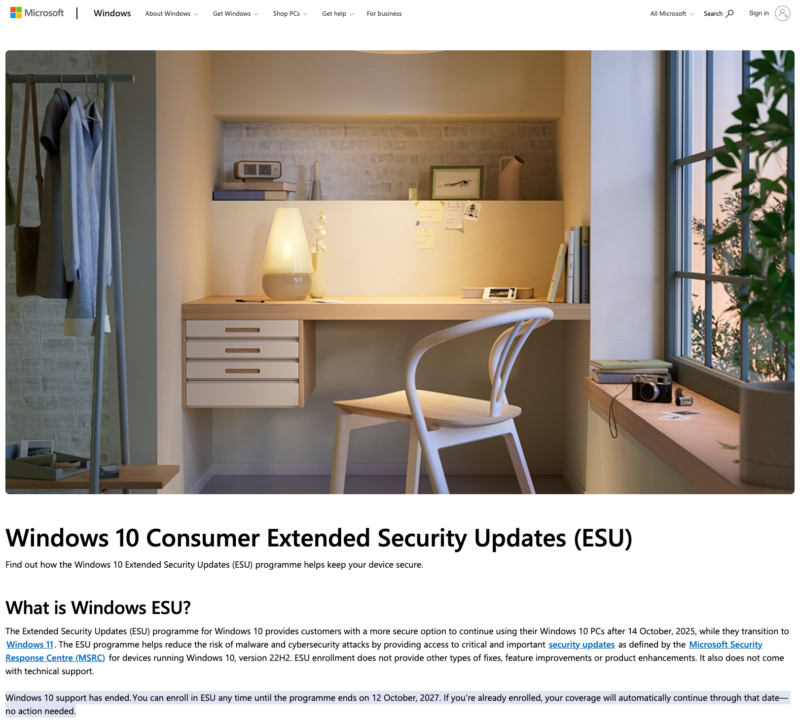
The ESU Programme for consumers was meant to operate for a year, ending on the 14th of October 2026. That’s changed to the 12th of October 2027.
In the most silent of silent changes to the Windows 10 ESU Page, the change went live. It now says:

The notable line is:
Windows 10 support has ended. You can enroll in ESU any time until the programme ends on 12 October, 2027. If you’re already enrolled, your coverage will automatically continue through that date—no action needed.
Which, for those of you hanging onto Windows 10 devices (out of need or other reasons), will be excellent news. You do need to enrol in the ESU programme to ensure you get updates. If you have enrolled already, no action is required.
Here’s what Microsoft has to say about that:
Enrol in Windows 10 ESU for consumers
If you haven’t already done so, to get the ESU through to 2027, you need to be enrolled on the programme. If you have already enrolled, no further action is needed.
For those devices that haven’t yet, you will need to make sure your device meets the following requirements:
- Devices need to be running Windows 10, version 22H2 Home, Professional, Pro Education or Workstations edition.
- Devices need to have the latest Windows update installed.
- The Microsoft account used to sign in to the device must be an administrator account.
- The ESU license will be associated with the Microsoft account used to enrol. You may be prompted to sign in with a Microsoft account if you typically sign into Windows with a local account.
- The Microsoft account can’t be a child account.
The consumer ESU programme can’t be used in commercial scenarios, and enrollment won’t be offered for:
- Devices in kiosk mode.
- Devices joined to an Active Directory domain or Microsoft Entra and/or enrolled in a Mobile Device Management (MDM) solution.
- However, devices that are Microsoft Entra registered can use the Consumer ESU programme.
- Devices that already have an ESU license.
How much does Windows 10 ESU cost?
You can enrol in ESU in one of the following three ways:
- At no additional cost if you are syncing your PC Settings.
- Redeem 1,000 Microsoft Rewards points (earned by searching the web with Bing.
- One-time purchase of $30 USD or local currency equivalent plus applicable tax.
All enrolment options provide extended security updates through 12 October 2027. You can enrol in ESU any time until the programme ends on 12 October 2027. The ESU licence covers up to ten devices.
Installing Windows 10 ESU
To get ESU on your Windows 10 device:
- Go to Settings > Update & Security > Windows Update. If your device meets the prerequisites, you’ll see a link to enrol in ESU.
- Once you select Enrol now, you’ll start the ESU enrolment. If you are signed into Windows with a local account, you will be prompted to sign into your Microsoft account. If you are already backing up your PC Settings, you will see a prompt to enrol your device.
- If you aren’t backing up your Windows settings, you can choose if you want to begin backing up your settings, redeem Rewards or make a one-time purchase to enrol in ESU.
You can use your existing ESU license on up to 10 devices once you enrol in ESU.
There’s a full guide at https://www.microsoft.com/en-gb/windows/extended-security-updates.
What about if I operate a business?
If you operate a business, use Windows in a business environment, or meet the exclusions that Microsoft has identified in the past, prepare to open your wallets and start sourcing replacement hardware.
We’ll go into replacement costs in a bit, with RAMmageddon changing your numbers a fair bit.
- Year 2 of the ESU will set you back US$122/£132 ex VAT/€130.56 per device.
- For year three (the last planned year of the ESU programme), these prices double again to US$244/£264/ €261.17.
You’ll need to talk to your local friendly Microsoft Licence Reseller who will relieve you of the cash and issue your license codes as needed.
Blame the RAMmageddon
So, what’s with the change of heart? Well, the cost to Microsoft will continue to be minor, as it’s got to pump out updates for the business users – as I suspect developers don’t want to be paid in Microsoft Points.
There are some annoying facts, with Statcounter going through its numbers, and estimating over 26% of the worldwide PC fleet is still running Windows 10. That’s a massive population to leave unpatched and unsupported.
In addition, market conditions have taken over, with the build-out of Data Centres, AI-focused chips and Compute Accelerators. Those chips and servers require many things, but from a technical point, DRAM (Dynamic random-access memory) has been a pain point for only a few suppliers in the world (including Micron, SK-Hynix and Samsung as the major producers, with several other minor producers).
Those DRAM memory chips go into DDR5, HBM Memory, GDDR7 and so on – products you will wind up using if you realise it or not.
With big companies such as Amazon (with AWS), Microsoft, Google and Meta leading the charge on hoovering up their chips for their data centre buildouts, with Nvidia and AMD not helping mount these chips on the Processing Accelerators and keeping them for enterprise customers, there’s a problem. Prices for consumers and businesses go up –fast.
Notable recent price hikes include:
- Apple raising their prices from between $100 and $300 last week
- Microsoft raising prices on its Xbox family and Surface devices
- Nintendo bumping up the price of the Switch2
- Valve releasing its Steam Machine console starting at $1049, scaling to $1349 (when the starting price was expected to be around $700)
- Major OEM’s increasing the price of computers
- PC Memory kits quadrupling in price
- Solid State Storage trebling in price
- And even hard disks nearly going up 60%.
And if you think it’s not going to hit you, think again.
If you have a tech product (or not in a lot of cases) and it uses DRAM, you’re impacted. That scales from your smartphone, your car, smart fridge, smart speaker, electronic door system, video camera, and so on…
In simple terms: If your device has a microchip in it, and it uses DRAM, you are going to wind up paying more.
With the long lead times to create infrastructure to manufacture DRAM packages and NAND memory (about three years in a positive cycle), the major manufacturers are expecting this to drag on in 2028 and beyond – with SK-Hynix expecting it not to ease until 2030.
Thus, consumers and corporates are not buying at the moment, or only having to buy if they absolutely have to (your author has already budgeted their next new phone in 2028, whilst their main laptop? 2027 if they can hold out that long)
Take the freebie and run with it.
Being more editorial than normal (and this piece has been mostly editorial/opinion) for consumers, this is a win. If you’re still running Windows 10, take Extended Security updates and run with it.
If you’re running Windows 10 in a business environment (or in one where you have to pay for the ESU), please do the numbers before committing to year two of the ESU Programme. In some cases, it will be unavoidable. In other cases, you might be able to squeeze a small refresh in based on new purchases or returned equipment. And I know a lot of IT Engineers are excellent at recycling kit into supported solutions.
And hopefully in the year, we might either see the AI bubble pop and prices crash, or second-user equipment that can run Windows 11 come down to a reasonable price.
Good luck out there if you’re PC, computer, or phone shopping.
Your credit card will need that luck in case prices are jacked up again this year.
… and that is more than a safe bet at the time of writing.
Welcome to Economy Class and Beyond. Your no-nonsense guide to network news, honest reviews, in-depth coverage, unique research, as well as the humour and madness I only know how to deliver.
Our Social Media pool has expanded. You can find us across most networks as @economybeyond on BlueSky, Threads, Mastodon and Instagram!
Also, remember that we are part of the BoardingArea community, bringing you the latest frequent flyer news from around the world.
Leave a Reply